



Introduction: Why Shopify Guest Checkout Is a Conversion Multiplier
Cart abandonment is one of the costliest leaks in ecommerce. The average Shopify store sees 68–75% of carts abandoned, and one of the biggest reasons is forced account creation before checkout. In short, the more friction you add between “Add to Cart” and “Pay Now,” the more revenue you lose. That’s why enabling Shopify Guest Checkout has become one of the highest-impact CRO changes — especially for brands running paid traffic, subscriptions, bundles, or high-ticket products.
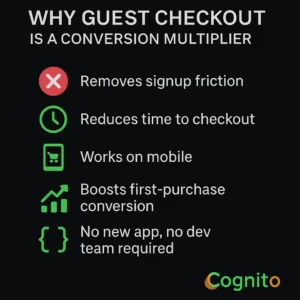
✔ Removes signup friction
✔ Reduces time to checkout
✔ Works on mobile where 60–70% of orders start
✔ Boosts first-purchase conversion without changing the funnel
✔ No new app, no dev team required
Stat: 24% of shoppers abandon checkout because they are “forced to create an account.”
(Source: Baymard Institute — 2024 Checkout UX Report)
If you’re still requiring login before purchase, you’re not losing visitors — you’re losing revenue.
What Is Shopify Guest Checkout?
Shopify Guest Checkout allows customers to complete their order without creating an account, logging in, or saving a password. The shopper only enters shipping, billing, and payment details — nothing more.
Guest checkout works with:
- Shopify Standard Checkout
- Shopify One-Page Checkout (2024 update)
- Shopify Plus customized checkout
- Shop Pay accelerated checkout
- Post-purchase funnels and flows
- Klaviyo, Yotpo, Attentive, and all major retention tools
✅ It is NOT the same as “Express Checkout” (Shop Pay, Apple Pay, PayPal)
✅ It does NOT remove the ability to collect emails
✅ It does NOT block post-purchase or account creation later
Why Shopify Guest Checkout Reduces Cart Abandonment (With Data)
| Reason for Abandonment | % of Shoppers | Guest Checkout Fixes It? |
|---|---|---|
| Forced login / account required | 24% | ✅ Yes |
| Checkout too long / too many steps | 18% | ✅ Yes |
| Complicated form fields | 17% | ✅ Yes |
| Didn’t trust website | 14% | ✅ Yes (one-page checkout increases trust) |
| Payment issues | 9% | ❌ No |
Enabling guest checkout does not reduce AOV.
It increases first-purchase conversion and allows brands to win repeat purchases later through post-purchase flows.
Guest Checkout vs Account-Only Checkout (Comparison Table)
| Criteria | Guest Checkout | Account Required |
|---|---|---|
| Cart Abandonment | Lower | Highest |
| Mobile Conversion | Higher | Lower |
| Time to Checkout | ~40% faster | Slower |
| Good for First-Time Buyers | ✅ Yes | ❌ No |
| Data Collection | Email + phone still captured | Full profile |
| LTV Impact | Must be earned with lifecycle flows | Pre-built personalization |
| Upsell Compatibility | ✅ Works | ✅ Works |
| Psychological Friction | Lowest | Highest |
✅ Forcing account creation increases friction
✅ Offering optional account creation after purchase increases adoption
The UX Science Behind Shopify Guest Checkout
Guest checkout works because it removes identity friction — the psychological barrier of being asked to commit more than money.
Behavioral triggers:
- Cognitive Load Reduction: fewer fields = less effort
- Ownership Bias: once user sees shipping total, they feel closer to purchase
- Momentum Effect: The buyer is already committed once they click “Checkout”
- Choice Elimination: No account/signup decision = no delay
- Trust Gap Shrinkage: Lower perceived risk than “create account” walls
The “Friction Score” Framework (CRO Method)
Every checkout has 6 friction variables:
| Friction Type | Example | Fix |
|---|---|---|
| Cognitive | Too many fields | Autofill + hide optional fields |
| Emotional | “Why do they need my birthday?” | Remove unnecessary fields |
| Technical | Slow page load | Shopify Checkout = fastest |
| Psychological | Forced account creation | Enable guest checkout |
| UX | Desktop-only layout | Mobile thumb-zone placement |
| Trust | No payment badges | Add secure payment icons |
Account-only checkout scores highest in friction.
Guest checkout almost always results in a lower score.
How to Enable Shopify Guest Checkout (Step-By-Step)
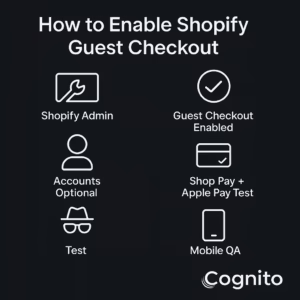
- Go to Shopify Admin → Settings → Checkout
- Under Customer Accounts, select:
✅ “Accounts are optional” - Save
- Test checkout in incognito mode
- Confirm both flows still work:
– Guest Checkout
– Login Checkout - Test with Shop Pay & Apple Pay enabled
- QA mobile version
- Run A/B test if traffic >20k monthly
Where Most Brands Go Wrong (Top Mistakes)
❌ Enable guest checkout but force email before checkout
❌ Add surprise fields (birthday, gender, phone required)
❌ Disable Shop Pay and call it “guest checkout”
❌ Force account creation post-purchase
❌ Break express checkout buttons on mobile
❌ Add popups during checkout flow
❌ Use 3-page “classic” checkout instead of one-page checkout
UX Checklist for High-Converting Shopify Guest Checkout
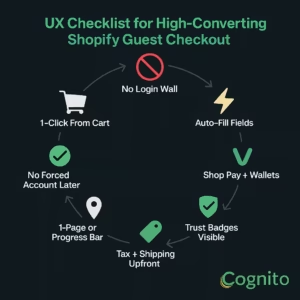
✅ No login wall
✅ Checkout starts within 1 click of cart
✅ Auto-fills shipping + billing fields
✅ Shop Pay, Apple Pay, Google Pay enabled
✅ Trust badges visible above fold
✅ Mobile keyboard auto-type fields (email, numbers, name)
✅ Progress indicator or 1-page checkout
✅ Tax + shipping visible before final submit
✅ No surprise account creation at the end
Email + SMS Capture Strategy (So You Don’t Lose Customer Data)
Even with guest checkout, you STILL capture:
- Email (required for order updates)
- Phone (optional, but incentivized with shipping updates)
- Name + shipping address
- Products purchased
- Purchase timestamp + device + source
✅ Klaviyo, Attentive, Postscript, Yotpo, and SMSBump all capture guest checkout data
✅ You don’t lose retention — you remove friction up front and win loyalty after
Pro tip: Trigger a welcome flow for guest buyers:
Flow:
Order Placed (Guest) → “Your order is confirmed” + optional “create account” CTA → Cross-sell email → Review request → Repeat purchase sequence
Case Study
A D2C health brand selling consumables forced login at checkout.
Before:
Conversion Rate: 2.3%
Cart Abandonment: 72%
Return Customer Rate (90-day): 21%
After switching to guest checkout:
Conversion Rate: 3.6% (+56%)
Cart Abandonment: 51%
Return Customer Rate (90-day): 23% (neutral change)
Result: +$118,000 monthly revenue added
Time to change setting: <5 minutes
Dev work required: None
Advanced Strategy: Conditional Guest Login
Smart checkout logic:
- First-time buyers → Guest Checkout default
- Returning buyers (known email) → Login auto-prompt with “skip & checkout as guest”
- Subscription product in cart → Account suggested but not forced
- B2B structured orders → Account required for tax exemption
Final Takeaway
If you’re still blocking checkout behind a login wall, you’re not protecting customer data.
You’re blocking revenue.
Shopify Guest Checkout is not a growth hack — it is the default conversion standard in 2025.
Lower friction = lower abandonment = higher revenue.
It’s that simple.
🚀 Want This Fixed and Optimized For You?
We help Shopify brands:
✅ Enable guest checkout the right way
✅ Reduce abandonment + increase conversion rate
✅ Install post-purchase flows to retain guest buyers
✅ Add tracking + UX improvements without apps or dev risk
Reply to get a free checkout audit and implementation roadmap.
📩 Get your free audit here: https://cognitoitconsultancy.com/
📧 Book a Strategy Call: sandy@cognitoitconsultancy.com
👉 Meet Now: https://cal.com/cognitoitconsultancy/30min
🔗 Shopify Experts: Click Here
Follow Us for More Insights on D2C and Digital Transformation
Stay ahead of the curve in e-commerce, digital strategy, and IT consulting by connecting with us on our social platforms:


FAQ
1. Does guest checkout reduce repeat purchases?
No — repeat purchases are driven by post-purchase flows, not login gates.
2. Can I still collect email and phone with guest checkout?
Yes — Shopify requires email for receipts and supports SMS opt-in.
3. Can I offer account creation after checkout?
Yes — this is called “Deferred Account Creation” and it converts higher than pre-checkout prompts.
4. Does guest checkout work with subscriptions?
Yes — but subscription apps may prompt account setup after payment.
5. Does it affect analytics or attribution?
No — all customer + order data is still captured in Shopify, Klaviyo, GA4, and retention tools.
6. Is this available on all Shopify plans?
Yes — only customized checkout fields require Shopify Plus.
7. Should I A/B test this?
If you have more than 10,000 monthly sessions, yes. Otherwise, turn it on now.